Batch-A
Automating Automation...
Equipment Module Classes
For (command-driven) Equipment Module Classes we generate complete documents by combining:
- Document data from an Excel workbook,
- A Word template, and
- Configuration data extracted from FHX.
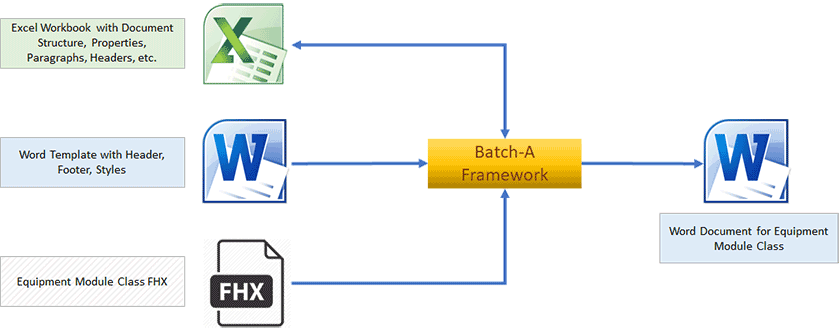
Excel Workbook
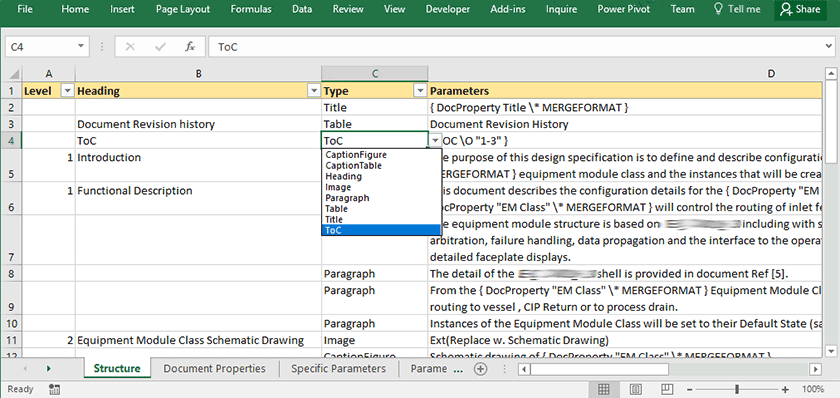
The Excel workbook defines the structure and content of the document. Each row in the main worksheet represents an element in the final document, such as:
- Headings and subheadings,
- Paragraphs of explanatory text,
- Captions for figures and tables,
- Images and schematic placeholders,
- Tables for lists, parameters, and other configuration data.
Additional worksheets can be used to maintain supporting data such as revision history, device lists, parameters, and custom document properties. These values are automatically inserted into the generated document.
This approach makes it easy to standardize documentation across multiple Equipment Module Classes and to adjust layout or content centrally in Excel.
Word Template
The Word template provides the overall look and feel of the document. It typically includes:
- Headers and footers (for customer logo, project details, etc.),
- Predefined styles for headings, body text, tables, and captions,
- Optional document properties that can be updated from Excel.
By combining the Excel-driven content with a standardized Word template, every document follows the same layout and formatting rules, while still being specific to a particular Equipment Module Class.
FHX File
The FHX file supplies the technical data from the DeltaV configuration. For one or more (command-driven) Equipment Module Classes we extract, for example:
- Module blocks and devices,
- Operating, tuning, and calculated parameters,
- Linked or embedded composites,
- Command structures and SFC logic.
This ensures the generated document reflects the actual configuration, reducing manual effort and the risk of inconsistencies between design and implementation.